DepthOfUnity Elective Submission
This elective taught me a lot about Unity and C#. Our lecturer highlighted the benefits of custom tools for non-programmers, such as creating an event system. One of the projects involved programming a tool using the ChatGPT API that allowed users to manipulate an existing scene simply by typing a prompt in an editor text field, among many other useful features. The submission required us to develop one custom tool, several extension methods, editor scripting, and helper components.
Overview:
5th semester (10.2024 – 02.2025)
Submission of deeper Unity topics
SaveSystem
Extension methods
Editor scripting
Helper components
Language: C#
Important Learnings:
Tool-Development
How Unity Editor works
Generating package-files
Submission Content:
Save System:
SaveSystem.cs (Static class) handles saving/reading
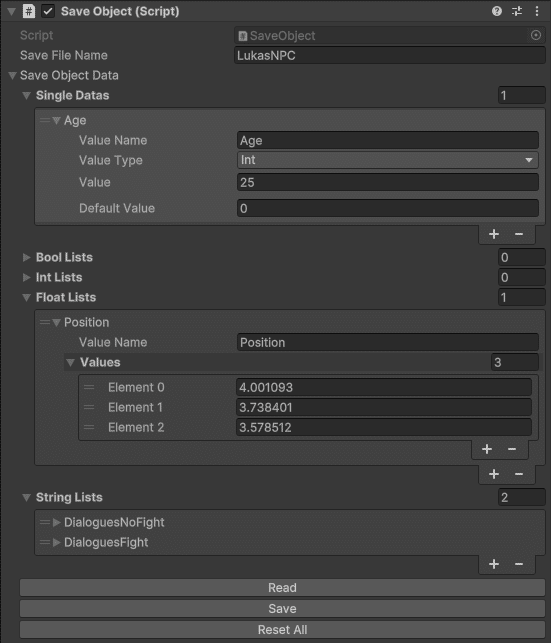
SaveObject.cs (MonoBehaviour) represents a single SaveFile (multiple SaveObjects are possible).
Here the user can:
Set the SaveFileName
Set saveable Data (Single Data/List Data) with individual ValueNames
Set corresponding default values (if values get reset)
Possible data-Types: bool, int, float, string
If a SaveObject reads in data the first time and wasn’t saved yet, a save-file will be automatically generated. Reading happens in the SaveObjects Start-Callback.
Savefiles are saved to %AppData%LocalLow/
„CompanyName“/“ProjectName“/“SaveFileName“.save
Used Editor-Scripts:
SaveReaderOnSelect.cs
Reads in the data into the SaveObject as soon as the holding GameObject gets selected in Editor
SaveObjectEditor.cs
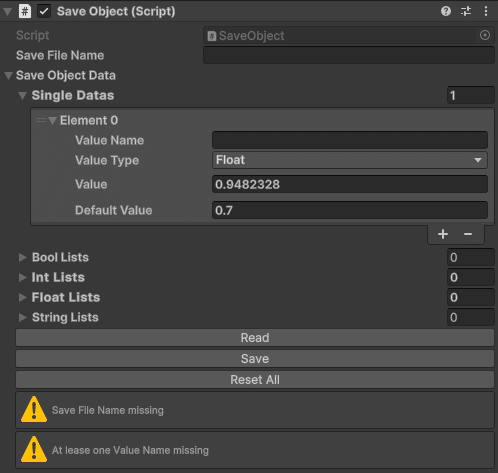
Draws Inspector-Buttons for Methods (Read, Write, Reset All)
Draws Inspector-HelpBoxes if SaveFileName or ValueName is empty
Helper Components:
BlinkingCanvasGroup.cs
Makes a (required) CanvasGroups alpha-value go up-and-down over time to make UI-Objects blink
User can set the blinkSpeed
GizmoDebugger.cs
Draws the selected GizmoType (Cube, Sphere, Line, Ray, WireCube, WireSphere)
Properties like color, size and originPositionOffset can be set by the user
Extension Methods:
I made a little interpolation-library using extention-methods.
Parameters for the methods are usually
targetValue (to interpolate towards)
duration
EaseType (see description below)
callback (called when the interpolation finished)
InterpolateExtentionMethods.cs
Transform:
INTERPMoveTo moves the object
INTERPRotateTo rotates the object
float / Vector3 / Color:
INTERPOverTime changes the value
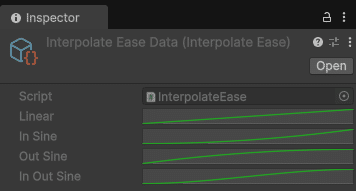
InterpolateEase.cs (Scriptable Singleton) stores globally accessible EaseTypes (AnimationCurves)
Linear
InSine
OutSine
InOutSine
More can be easily added by the user
Extension Methods usage:
StartCoroutine(transform.INTERPMoveTo(destinationTransform.position, travelDuration, EaseType.InOutSine, OnMoveToFinished));
StartCoroutine(testColor.INTERPOverTime(testColorTargetValue, testColorInterpolationDuration, EaseType.OutSine, value => testColor = value, OnColorOverTimeFinished));
StartCoroutine(transform.INTERPRotateTo(destinationTransform.rotation, travelDuration, EaseType.Linear, OnRotateToFinished));
StartCoroutine(testFloat.INTERPOverTime(testFloatTargetValue, testFloatInterpolationDuration, EaseType.Linear, value => testFloat = value, OnFloatOverTimeFinished));
StartCoroutine(testVector3.INTERPOverTime(testVector3TargetValue, testVector3InterpolationDuration, EaseType.Linear, value => testVector3 = value, OnVector3OverTimeFinished));