The Bond We Share
Find the Unity C# scripts on my GitHub
You can freely download the game on itch.io
Used external assets:
3D physics rope: ObiRope
3D scatter tool for fragile platforms: RayFire
Inspector buttons: Easy-Buttons
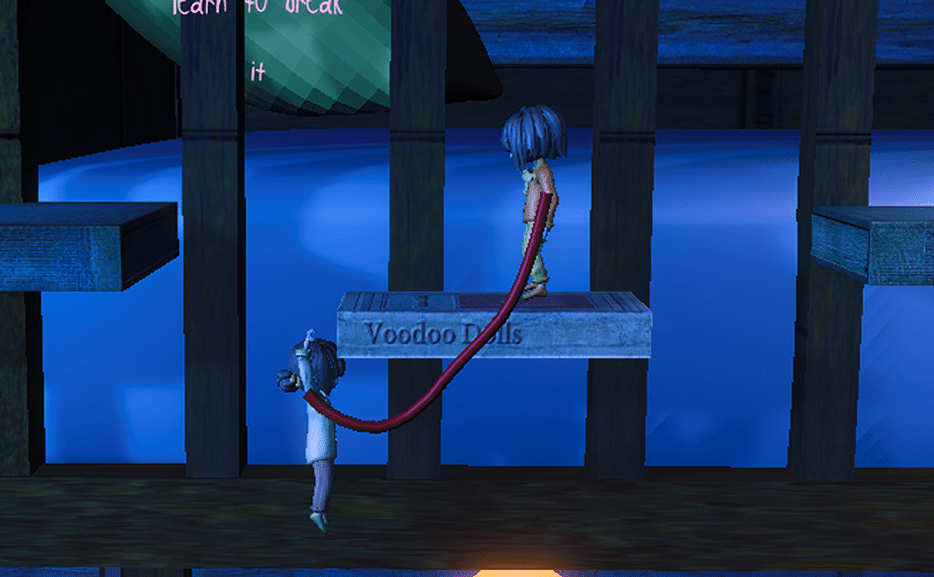
„The Bond We Share“ is a couch-coop 2.5D puzzle game in which the players are connected through a rope. If they cut the rope, everything around them changes to nightmare-world, but they can move individually. I did all programming.
Overview:
3rd semester team project
(10.2023 – 02.2024)Role: general programmer (C#)
Engine: Unity
Important Learnings:
Git managment
Physics-driven rope connects two physics-driven players (combining three dynamic forces to work together)
Developing tool for lighting artist
2.5D character controller (e.g. ledge grab, ladder climb etc.)
My contributions in a showreel
How gameplay elements were implemented
Rope:
It was most important to have a functioning rope system that holds both players in clamped distance and can be broken as well. Since our game dimension is 2.5D, a 3D rope was needed. I decided to use ObiRope from the Unity Asset Store. It provided some good documentation and seemed to do what we needed by colliding with world-objects, having believable physical behavior, can be rendered in various ways and has some useful example scenes included.
Unfortunately, I quickly realized that this rope asset was not meant to be used in a way that combines two dynamic physical driven objects (the characters) to it. All the example scenes work with one dynamic object at one end and one static object at the other. I was not able to find another 3D rope asset that could solve this issue, so I had to use some tricks to overcome certain problems coming with that. These were for example that the players could use dozens of glitches to stretch the rope further than it should, and that caused the players to fly over the map due to the intersecting physics systems of the rope and the characters.
I had to make the characters not react to the rope anymore unless they exceed a set distance, or when one of the characters starts to hang at the rope, or swings. In both cases, strict rules were set up to avoid physics behaving unintendedly again. For example, if one player starts to hang, only this player is affected by the rope, the upper player still isn’t. When they exceed their maximum distance, only the players are affected that are not in an idle pose, and the effect goes away again as soon as they’re pushed back in the allowed distance.
To be able to use rope swinging momentum and even more important for me, making the rope swinging feel good, I had to make the player add a rigidbody-force to the characters current velocity, so that the force keeps being added to the tangent of the swinging radius instead of just adding to the x-Position of the player. This made swinging much more believable and solved the problem of having momentum when cutting the rope while swinging to get to further away places.
World Switching (Normal- and Nightmare-World):
Exchanging the world objects was just toggling between two parent objects that hold each world’s platforms. Also, cutting the rope was included in the ObiRope asset, and I just had to switch off the distance boundaries.
More complicated was to reconnect the players. Again, the rope was not meant to be used in a too dynamic fashion. Instantiating a new rope during runtime and parenting it to the two dynamic characters was not possible for me without having the rope doing unexpected movements. So I had to decide to respawn the players according to their former look-direction with the rope already attached beforehand in the prefab.
Switching worlds also means that new platforms arise out of nowhere. That could cause the characters to stuck into a platform if they’re in an unfortunate position. By setting strict rules in the level design we were already able to avoid a lot of these issues. But sometimes it still happened, so I had to write a script that detects if a player is stuck in a horizontal platform, and if so, check if he’s more above or below and then gets pushed up, or downwards accordingly.
I could not find any possibility to exploit this resolving-system to the players advantage.
Character Controller:
The CharacterController is self-made and uses easy-to-understand architecture. I set up an FSM for all the possible states the player can be in. For each state in the update-function specific values get checked that, if match, call something.
For example, if the player falls and the y-velocity is greater than 0, it means that he’s suddenly going up again, caused by the rope catching the character and therefore the state should switch from „Falling“ to „RopeHanging“.
Changing the state happens in a seperate function, in which specific calculations can be made, if an specific old state was left or if a specific new state was entered. It is even possible to easily check if a new state was entered from a specific old state, which for example was important for the switch between pushing and pulling an object and calling the right animations for that.
Players can die through fall height, by running out of time in the nightmare world or by getting into a DeadZone. Fall height is calculated by remembering the y-Position of the character when entering the Falling-state and checking at landing if its over a set threshold.
Different Platform Types:
Platforms can either occur in both or just one world . The types are
static platforms
moving platforms (which also can be activated by e.g. buttons)
fragile platforms.
The fragile platform gets destroyed by
a player got recognized standing on it, and leaves (exits) again or
a second player gets recognized
It destroyes by disabling the current platform and replacing it with a scattered version consisting of pre-scattered fragments (RayFire Asset).
Interactable Level Elements:
I also added several ingame level elements
Ladder (disables rigidbody-simulations while climbing)
Claw (can be opened and closed by a lever or a floor button and can hold and drop a moveable object)
Moveable Object (can be pushed and pulled around by the characters. While pushing an object, the character also checks constantly if the moveable object still is detected, meaning if the object felt downwards over a ledge, the character can recognize it and automatically
returns into idle state)
Levers (can be activated and deactivated permanently)
Floor Button (only activated while character stands on it)
Every state of any platform, claw, fragile platform, lever and so on must be reset when the players die. Therefore, a simple death event helps to tell all objects in the scene to reset.
Player Triggers:
Player Triggers are helpful for different types of use.
Functionally, we can decide if both players must enter the trigger to activate, as well as if both players must leave to deactivate, or if one leaving is already enough.
Types of Player Triggers
Checkpoint to save the new respawn position
CameraChanger (show the level from another angle/position)
FragileResetter (reset the fragile platforms if they’re already broken and the players need to try again)
PlayerHints (show the players useful tips through text or icons)
AudioEmitter (local audio playing in the world, which changes volume in relation to the distance)
LevelFinish (check if both players entered the last platform)
DeadZone (players die when entering)
Lighting:
Lighting works by changing the light-color if the world gets switched and in the nightmare world additionally light-color-switches happen over time, invoked through events.
Setting up lights was complicated!
One light can have several colors (world switching AND lerping)
Some lights are just available in one of both worlds
Moving Platforms have to be considerd in different positions
The lighting artist would have to start the game and call all events inside to see changes. That would have been very time-intense. So I made an Unity-editor-tool to make it easier for the lighting artist to check how the result will look like. Unity inspector buttons (EasyButtons Asset) could be used to switch between the worlds, the phases of the nightmare world and the positions of the moving platforms from the editor (even without starting the game)
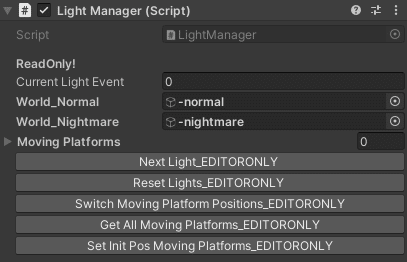
Since we needed to set up several light-colors for the phases of the Nightmare World, I wrote a
simple but working linear interpolation system to generate gradient colors between a manually set first and last nightmare color. The lighting artist only had to set these two colors for each light, and the others which are used by the nightmare phases are then generated by script.
Since the colors of the lights vary, I couldn’t bake lightmaps. That’s why I left all lights in real-time, and we set up rules to have as few shadow-casting lights as needed and the other light sources just brighten up the environment. Also I used the Forward Plus Rendering Path of Unity, which clusters all the light source information into a more efficient calculation pipeline for the rendering.
Sound:
I wanted each individual world object to be able to play their sounds through a centralized script, so
that only this script is needed to adjust the volumes if necessary, and not to adjust every single emitting object later on. That’s why all the emitting sound objects play their sounds through an AudioManager instance.
For the music I worked mainly with layers. Every music-clip is a layer, and every layer is played in the background, but only one is unmuted at a time. That makes it possible to always have the layers synchronized, because the layers share the same clip-length and otherwise just loop through. When the world switches, or a nightmare event happens, the current layer must be muted, and the next one must be unmuted. I was surprised that this already sounded seamless even without any volume
interpolation in between, so I just left it as it is.